

Disclosure: #sponsoredbybluehost | Paid partnership with Bluehost. I earn a commission if you sign up through the links in this article at no extra cost to you. All testing, opinions, and build screenshots in this review reflect our independent hands-on experience at ItGyan.
Setting up a functional business website used to mean picking between two stubborn hurdles: spending thousands of dollars on a custom developer or losing an entire weekend wrestling with bloated site templates, plugin conflicts, and server settings.
With generative AI reshaping productivity tools, Bluehost has launched a completely rebuilt platform: Bluehost AI Builder.
The core premise is refreshingly straightforward: "Describe your website. Build it with AI." You describe what your company does in plain English, tweak the layout and copy in a real-time conversational chat, and publish a responsive website to a live subdomain—$0 to start, no credit card required.
At ItGyan, we ran an end-to-end build test on the free tier to find out how practical it actually is. We created a mock consulting firm ("ApexCloud Solutions"), refined the layout through chat, tested the credit mechanics, and published it directly to a live Bluehost subdomain. Here is our honest walkthrough, breakdown of features, and verdict.
Table of Contents
- What is Bluehost AI Builder?
- Hands-on Walkthrough: Testing the $0 Free Tier
- Understanding the Credit Model & Plan Tiers
- Bluehost AI Builder Plans and Pricing Breakdown
- What About Selling Products Online? (AI Store Distinction)
- Frequently Asked Questions (FAQ)
- Final Verdict: Is Bluehost AI Builder Worth It?
What is Bluehost AI Builder?
Bluehost AI Builder is a prompt-driven website creator. Rather than starting with a blank canvas or a generic static template, the builder kicks off by asking you what you want to build and generates a custom layout, industry-focused copy, relevant imagery, and navigation menus on the fly.
Key Highlights at a Glance
- Prompt to Website: Describe your business or project in a single sentence, then refine copy and visuals inside the same chat window.
- Free to Go Live: You can build and publish a real, functional site on the Free plan with no credit card. It deploys instantly to a Bluehost subdomain (
yourname.app.bluehost.ai). - Hosting Included: Every plan includes cloud hosting, and hosting traffic never consumes your monthly AI credits.
- Credits that Don't Trap You: Monthly credits and top-ups expire after 30 days. However, running out of credits never takes your website down. The published site stays online; only new AI edits pause until your credits refresh or you top up.
- 24/7 Human Help: Real technical support is available 24/7 via chat and phone for domains, email, and site settings.
(Note: Bluehost AI Builder takes the place of Bluehost's previous "AI Website Builder" for all new users. If you have used older Bluehost builders in the past, this is a brand-new chat-centric engine.)
Hands-on Walkthrough: Testing the $0 Free Tier
To see how smooth the onboarding really is, we started from a fresh browser session with no billing details attached.
Step 1: The Initial Prompt
On the landing page, you are presented with a simple input box. You don't need a formal design brief or a sitemap—just describe your concept in ordinary words.
For our test run, we entered:
"Create a modern, clean technology consulting and IT solutions website for an agency called 'ApexCloud Solutions'. We specialize in cloud migration, cybersecurity audits, and enterprise automation. Include a hero section with a 'Book an Audit' button, service cards with icons, a client trust/testimonial section, and a contact form."
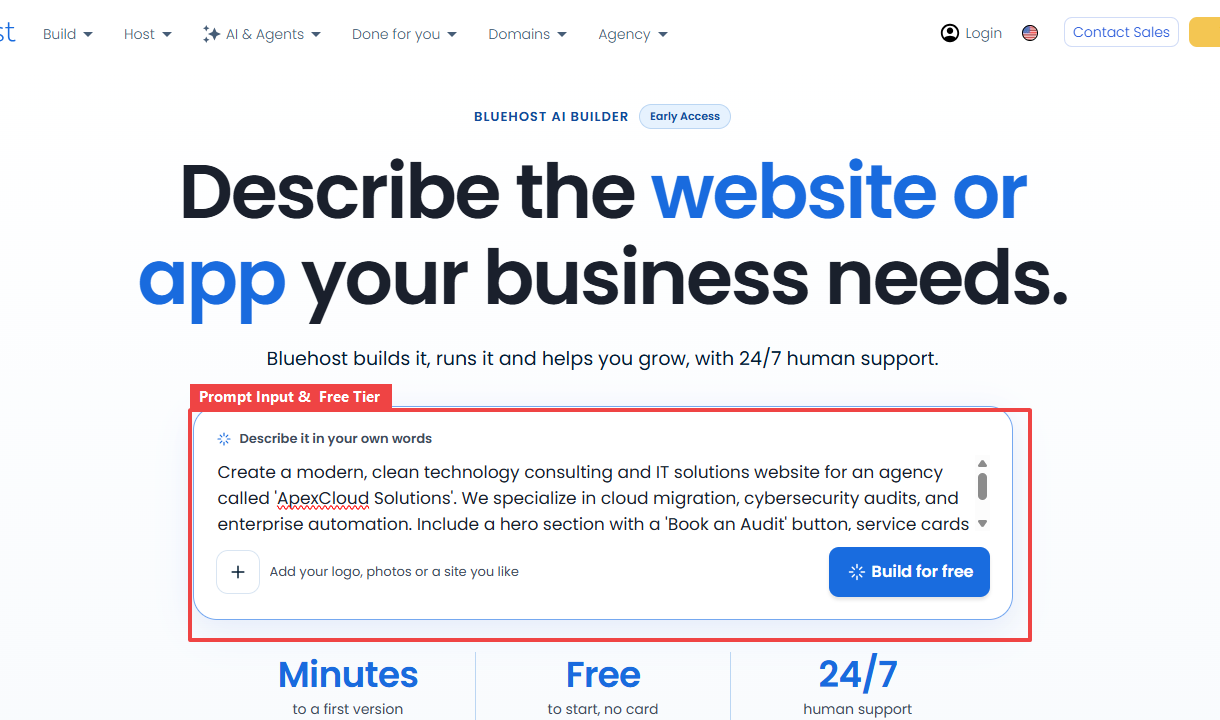
After clicking "Build for free", the platform asks you to create a free account (Google, Apple, GitHub, or email) to save your work. No credit card or payment information is requested.
Before building, the AI asks a few clarifying questions about your goals and business type. One pleasant surprise: the AI's clarifying questions are completely free and do not use up any of your message credits. You can also upload your own company logo or brand photos (PNG, JPG, or WebP up to 5 MB each), or point it at an existing site you like so the AI can match that aesthetic.
Step 2: The Initial Generation
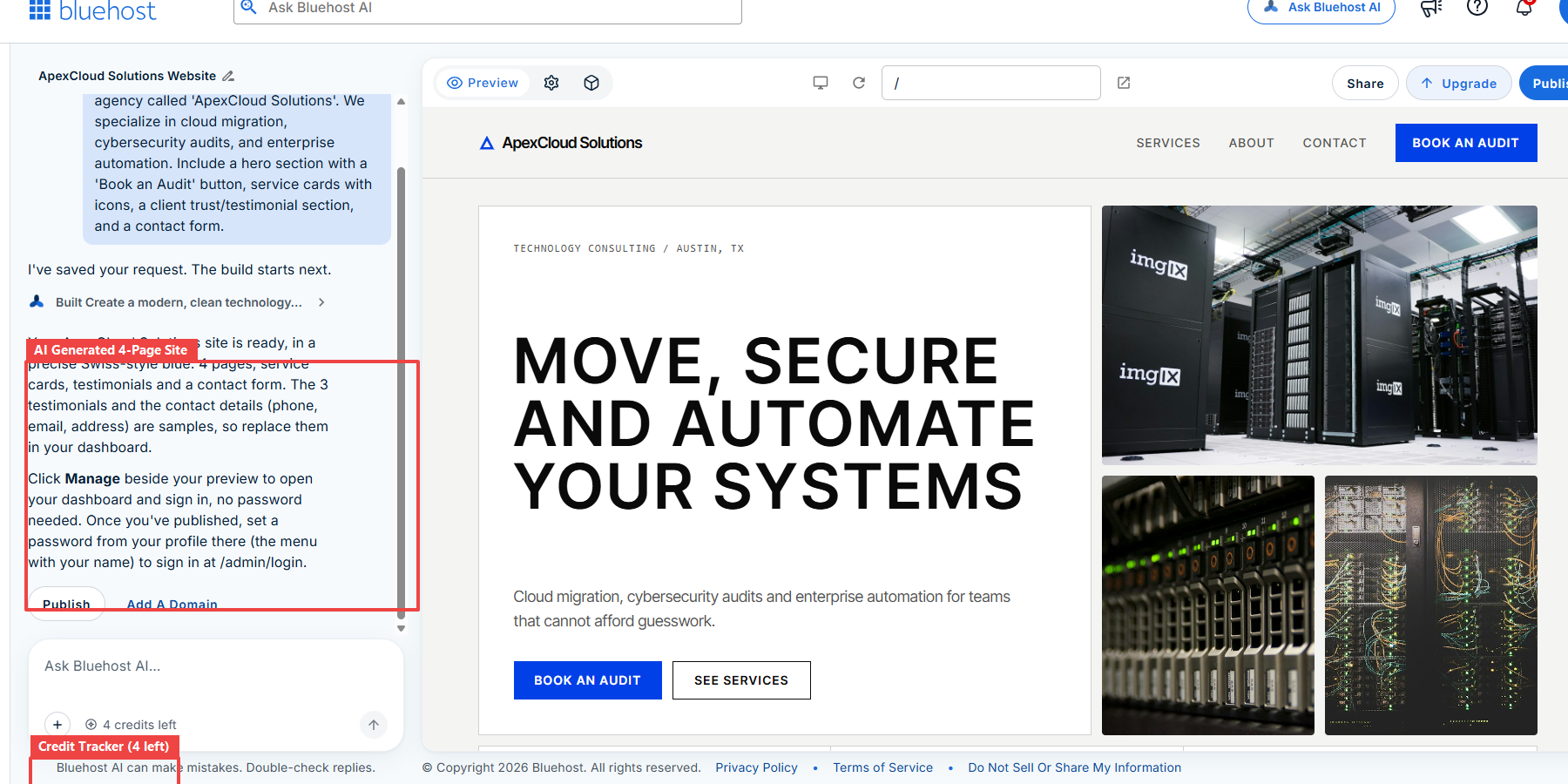
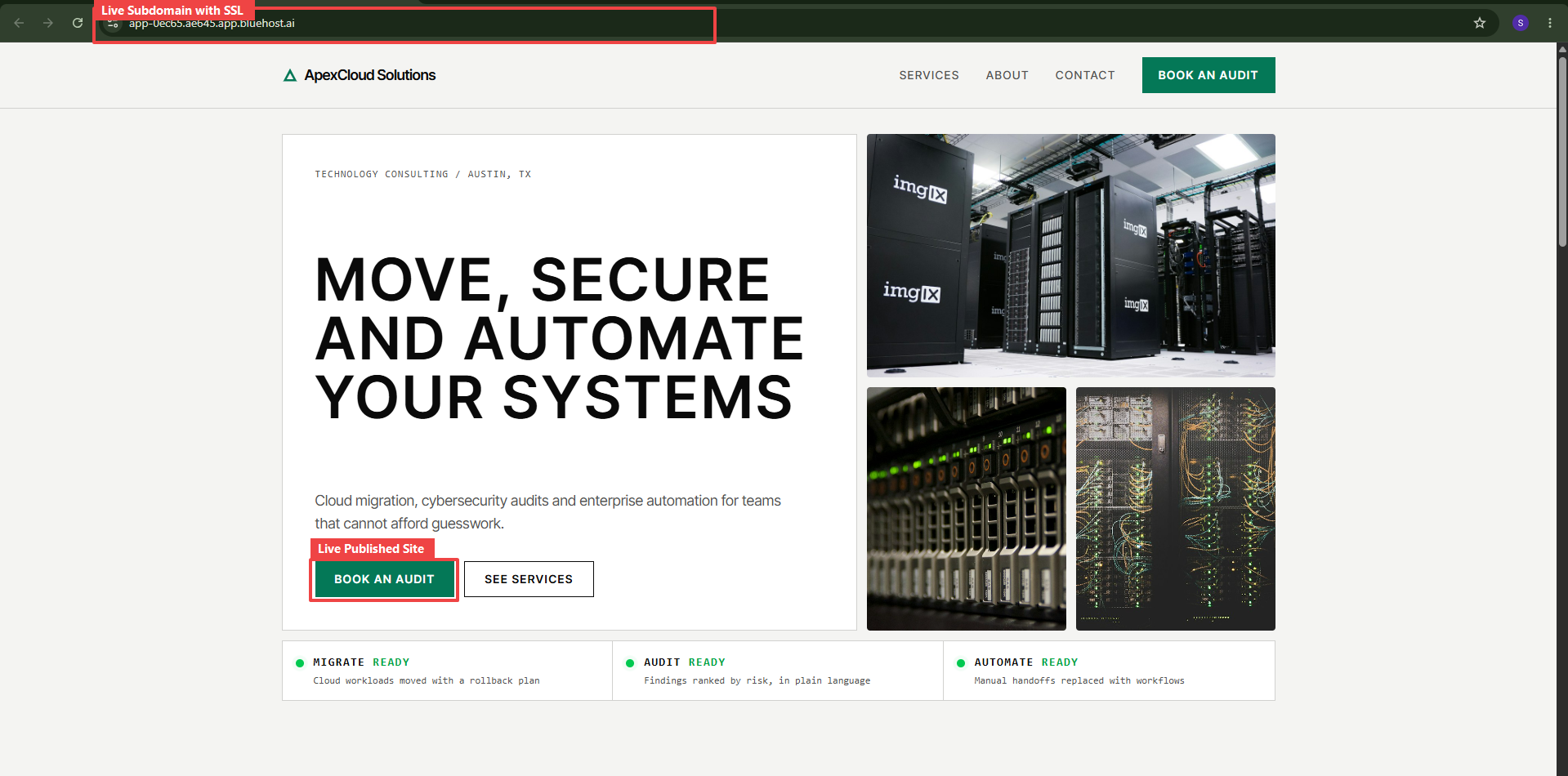
After processing for about 60 seconds, the AI presented our first version: a sharp, Swiss-style layout in clean corporate blue. It automatically organized:
- A bold hero headline: "MOVE, SECURE AND AUTOMATE YOUR SYSTEMS" with dual call-to-action buttons ("Book an Audit" and "See Services").
- High-resolution server infrastructure imagery.
- Structured service pillars for Cloud Migration, Cybersecurity Audits, and Enterprise Automation.
- Draft testimonial cards and an integrated contact form.
- Complete technical metadata: auto-generated page titles, meta descriptions, semantic header tags (H1, H2), and image alt text for SEO.
Step 3: Making Revisions Through Chat
Next, we tested the chat refinement engine. Instead of navigating confusing layout menus, you simply type what you want to adjust in the conversation bar.
We typed:
"Change the primary button color to emerald green and show me the mobile view"
Within seconds, the AI acknowledged the prompt, updated every primary action button across the site to emerald green, matched the dark blue contrast bands to a complementary deep forest tone, and prompted us to toggle the viewport tool.
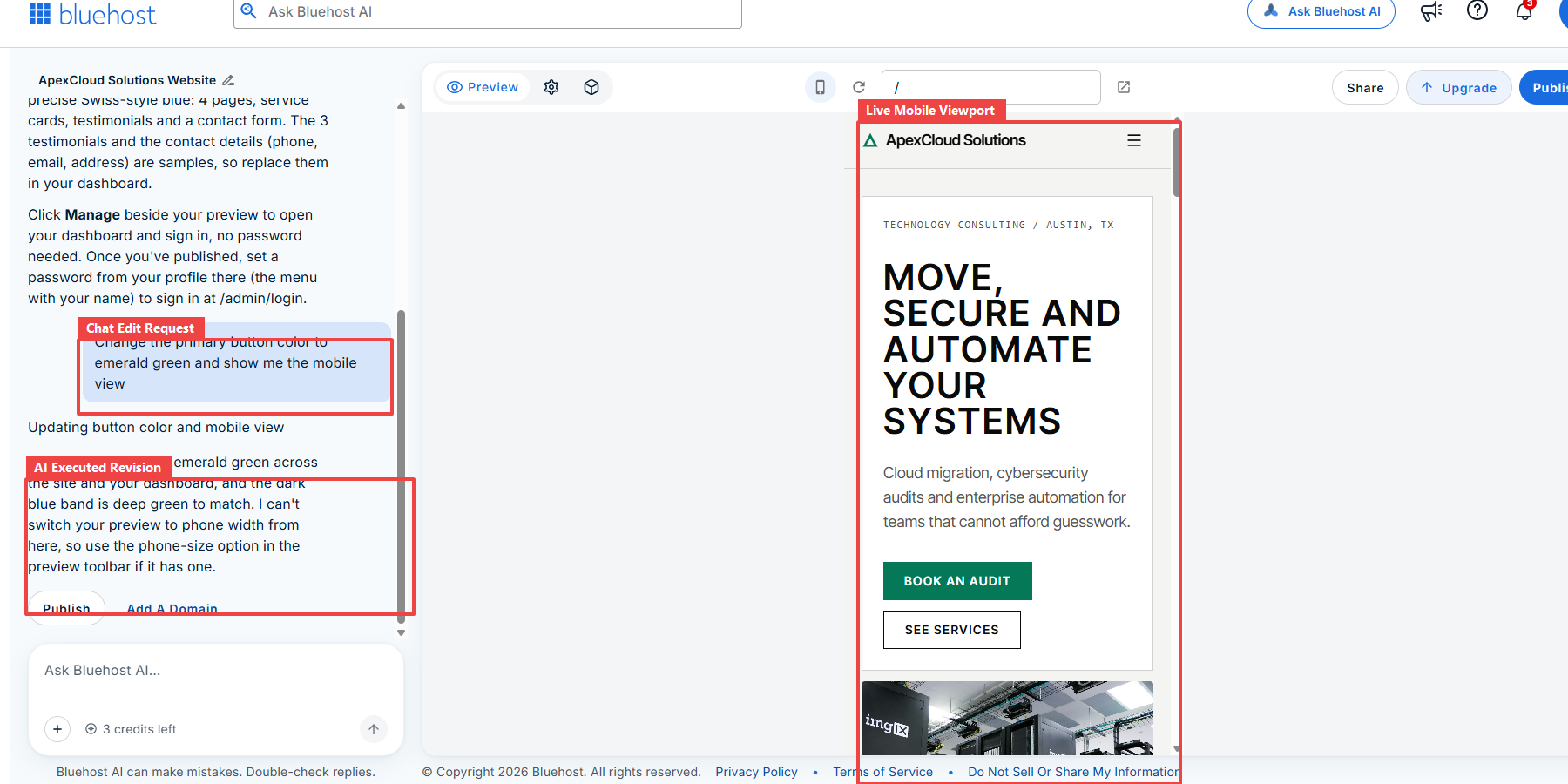
The top preview bar lets you flick between Desktop, Tablet, and Mobile views instantly. The typography stacked neatly on the simulated phone screen, the hamburger navigation menu functioned smoothly, and the buttons remained comfortably tappable.
Step 4: Publishing Live on the Free Subdomain
When you click Publish, you are given the option to connect a custom domain or publish immediately for free.
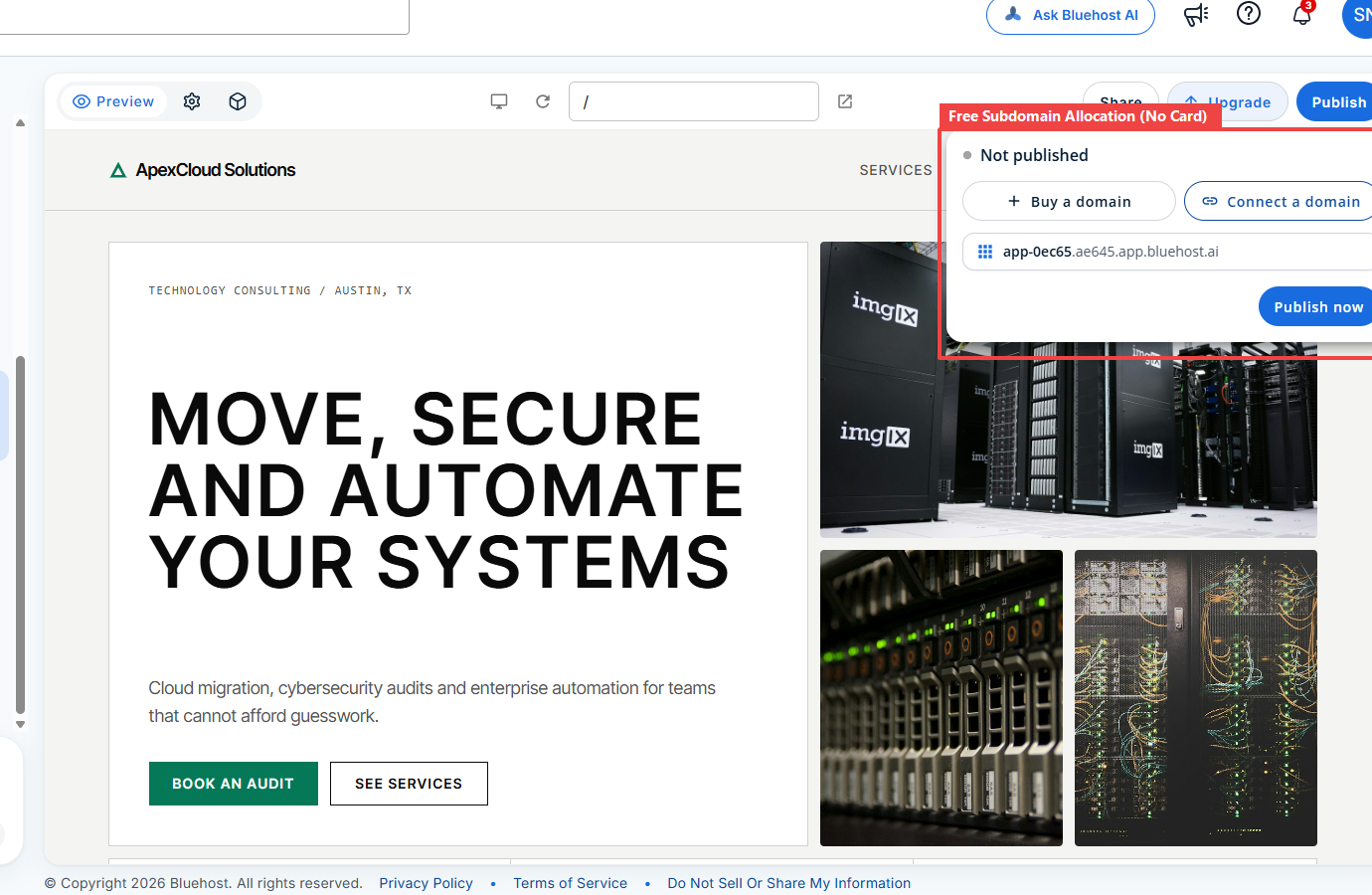
We selected the free subdomain option, and within moments, our site was live on the web at:
👉 https://app-0ec65.ae645.app.bluehost.ai/
(Note: This is our real test app created during this review. Because it runs on a free demo allocation, it may be refreshed or removed over time, but the screenshots above show the live deployment.)
Understanding the Credit Model & Plan Tiers
AI services often carry unpredictable pay-as-you-go surprises. Bluehost designed the credit system with clear, sensible rules:
How Message Credits Work
- 1 Message = 1 Credit: Sending a prompt or revision request consumes 1 credit.
- Clarifying Questions are Free: Clarifications asked by the AI don't cost anything.
- Hosting Never Uses Credits: Visitor traffic, page hits, and server bandwidth are completely decoupled from credits.
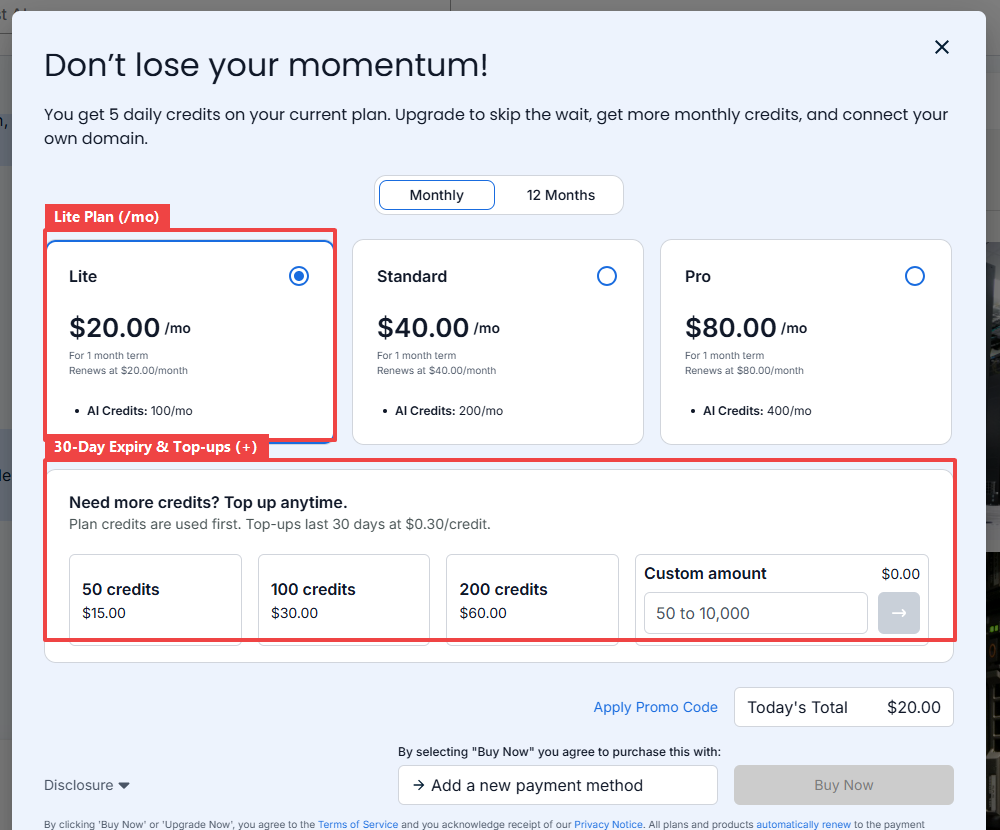
- 30-Day Expiry: Monthly plan credits and credit top-ups expire after 30 days.
- Top-Ups Available Anytime: If you run out of credits mid-session, top-ups come in packs of 50, 100, or 200 credits from $15 ($0.30 per credit).
- The No-Down Safety Rule: When your credits reach zero, the published site stays online; only new AI edits pause until your credits refresh or you add a top-up.
Bluehost AI Builder Plans and Pricing Breakdown
Bluehost AI Builder offers four distinct tiers depending on whether you want to stay on a free subdomain or connect your own brand domain:
| Plan | Price | Monthly Credits | Best For |
|---|---|---|---|
| AI Builder Free | $0 (No credit card) | 5/day (up to 30/mo) | Testing ideas, portfolios, publishing on a Bluehost subdomain. |
| AI Builder Lite | Paid plans from $20/mo | 100 credits/mo | Connecting your own custom domain, small business landing pages. |
| AI Builder Standard | $40/mo | 200 credits/mo | Growing sites with frequent content updates and revisions. |
| AI Builder Pro | $80/mo | 400 credits/mo | Managing several websites and higher-volume AI generation. |
Note: Connecting a domain you already own requires the Lite plan ($20/mo) or above; connecting an existing domain is separate from registering or renewing one. If you want to see how these prices compare against alternatives like Wix and Squarespace, check out our Bluehost AI Builder vs Top AI Site Builders comparison guide.
What About Selling Products Online? (AI Store Distinction)
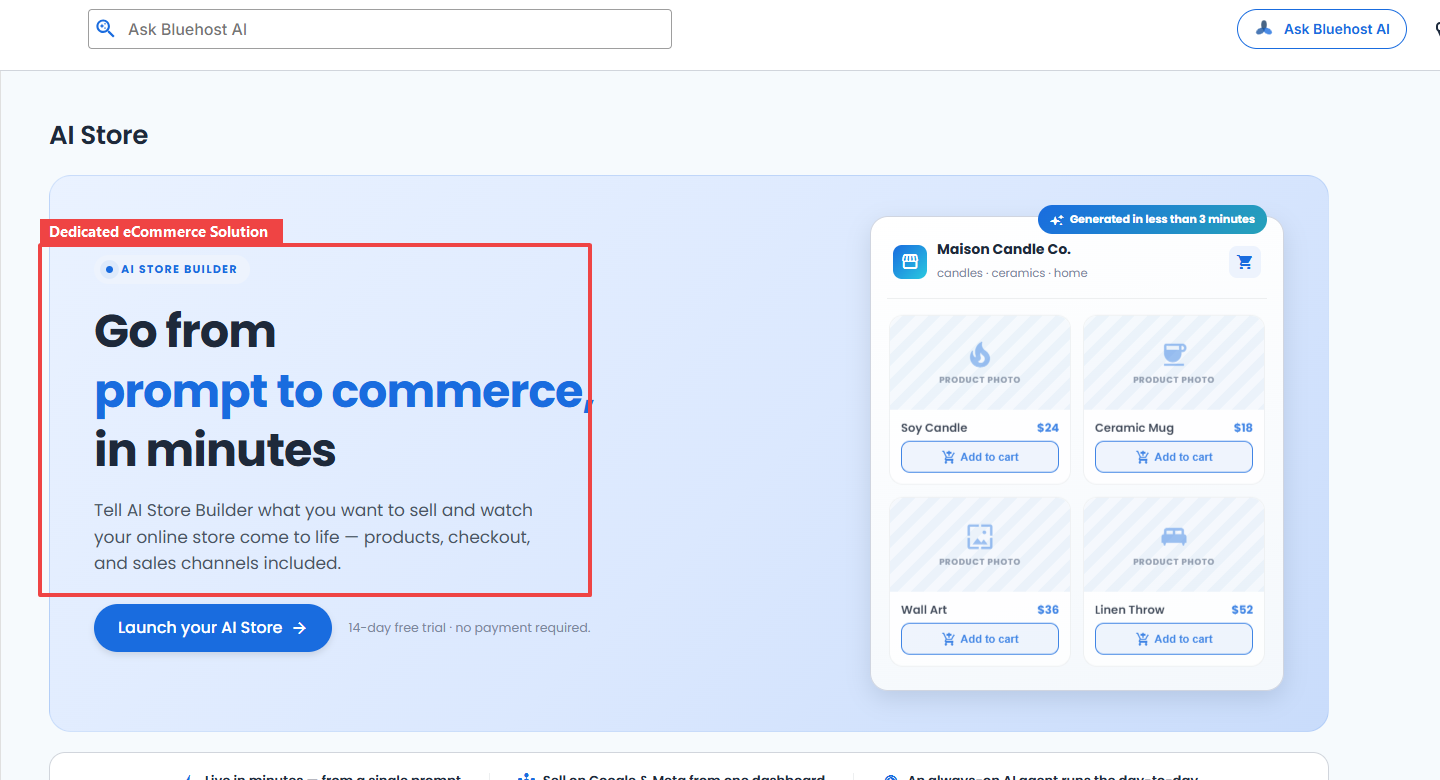
An essential distinction to keep in mind: Bluehost AI Builder does not support eCommerce or shopping carts yet.
If you want to sell physical merchandise, manage inventory, or take customer payments through a cart, send your traffic to Bluehost's dedicated shopping builder instead:
👉 Check out Bluehost AI Store for eCommerce (I earn a commission if you sign up through this link).
- Bluehost AI Builder: Ideal for business sites, consultants, portfolios, agencies, blogs, landing pages, and web apps.
- Bluehost AI Store: Purpose-built for eCommerce, digital downloads, inventory, and online payments.
Frequently Asked Questions (FAQ)
Can I really build and publish a live website for free with Bluehost AI Builder?
Yes. The Free plan allows you to generate a website from a prompt, edit it with conversational chat, and publish it live on a yourname.app.bluehost.ai subdomain at $0 to start, no credit card required.
Do Bluehost AI Builder credits expire?
Yes. Monthly plan credits and credit top-up packs expire after 30 days.
What happens if I run out of credits while editing?
Running out of credits never takes your website down. The published site stays online; only new AI prompt edits pause until your credits refresh or you purchase a top-up pack (available in 50, 100, or 200 credits from $15).
Can I connect my own custom domain on the Free plan?
Connecting a custom domain requires upgrading to paid plans from $20/mo (the Lite plan or above).
Does Bluehost AI Builder support shopping carts or eCommerce?
No. Bluehost AI Builder is designed for informational and business sites. For an online store with product checkout and inventory, use Bluehost AI Store.
Final Verdict: Is Bluehost AI Builder Worth It?
For freelancers, consultants, service businesses, and first-time founders, Bluehost AI Builder removes the typical headaches of getting a site off the ground. The conversational chat makes visual tweaks approachable, and being able to publish live without handing over credit card details makes it completely risk-free to test.
If you later want to connect your own branded .com domain, you can seamlessly step up to paid plans from $20/mo.
Ready to see what the builder creates for your business idea?
I earn a commission if you sign up through this link.