

Disclosure: #sponsoredbybluehost | Paid partnership with Bluehost. I earn a commission if you sign up through the links in this article at no extra cost to you. This comparison reflects independent hands-on testing by the technical editorial team at ItGyan.
With generative AI transforming web design in 2026, Bluehost AI Builder and other modern website creators make it possible to launch a site from plain text in minutes without touching code.
However, as almost every major host and software vendor adds an "AI" badge to their product line, finding the right tool has become confusing. Some platforms hide standard, rigid templates behind a questionnaire wizard. Others let you generate a page for free, only to lock your preview behind an aggressive credit card paywall before you can even test whether the design works on mobile.
At ItGyan, we spent time testing the top platforms—comparing Bluehost AI Builder, Wix AI, Hostinger AI Website Builder, and Squarespace AI. Here is our head-to-head breakdown of their actual speed, pricing transparency, and day-to-day usability.
Table of Contents
- Head-to-Head Comparison Table
- 1. Bluehost AI Builder: The Winner for Friction-Free Testing
- 2. Wix AI: Great Flexibility, Higher Complexity
- 3. Hostinger AI Website Builder: Budget-Oriented, Rigid Layouts
- 4. Squarespace AI: Beautiful Aesthetics, Premium Cost
- Pricing & True Cost of Ownership Compared
- Important Distinction: Building Websites vs. Online Stores
- Frequently Asked Questions (FAQ)
- Final Takeaway: Which Builder Should You Choose?
Head-to-Head Comparison Table
Here is how the top AI website builders compare on the features that matter most to creators and small businesses:
| Feature | Bluehost AI Builder | Wix AI | Hostinger AI Builder | Squarespace AI |
|---|---|---|---|---|
| Free Plan with Live Subdomain? | Yes (On `.app.bluehost.ai`) | Freemium (Includes heavy Wix branding) | No (Paid hosting plan required) | No (14-day free trial only) |
| Credit Card Required to Start? | No (Sign up with email or OAuth) | No | Yes | No |
| Entry Paid Pricing | Paid plans from $20/mo | From ~$17/mo | From ~$3.99/mo (renews higher) | From ~$16/mo (annual commitment) |
| Build Interface | Conversational chat & prompt-to-site | Drag-and-drop canvas + wizard | Form-based prompt + block grid | Curated templates + AI copy assistant |
| Credit System | 5/day free (up to 30/mo); 100–400/mo on paid | Capped feature usage meters | Fixed AI generation tokens | Bundled into general plan |
| Credit Expiration | 30 days on credits & top-ups | Monthly reset | Varies by term | Monthly reset |
| Credit Top-Up Packs | 50, 100, or 200 credits from $15 | Add-on packs | Varies | Upgrade required |
| Uptime Protection | Live site stays online (Edits pause) | Standard uptime | Standard uptime | Standard uptime |
| Hosting Included? | Yes (On all plans, never uses credits) | Yes | Yes | Yes |
| eCommerce / Store Support | Separate tool: Bluehost AI Store | Integrated (higher tier) | Integrated | Integrated (higher tier) |
| 24/7 Human Help | Yes (Included on all plans) | Ticket / Callback | 24/7 Live Chat | 24/7 Chat & Email |
1. Bluehost AI Builder: The Winner for Friction-Free Testing
Bluehost AI Builder takes a fresh approach compared to legacy site editors. Instead of throwing you into a sprawling dashboard with hundreds of menus, it revolves around conversational prompt editing: "Describe your website. Build it with AI."
How It Performs in Practice
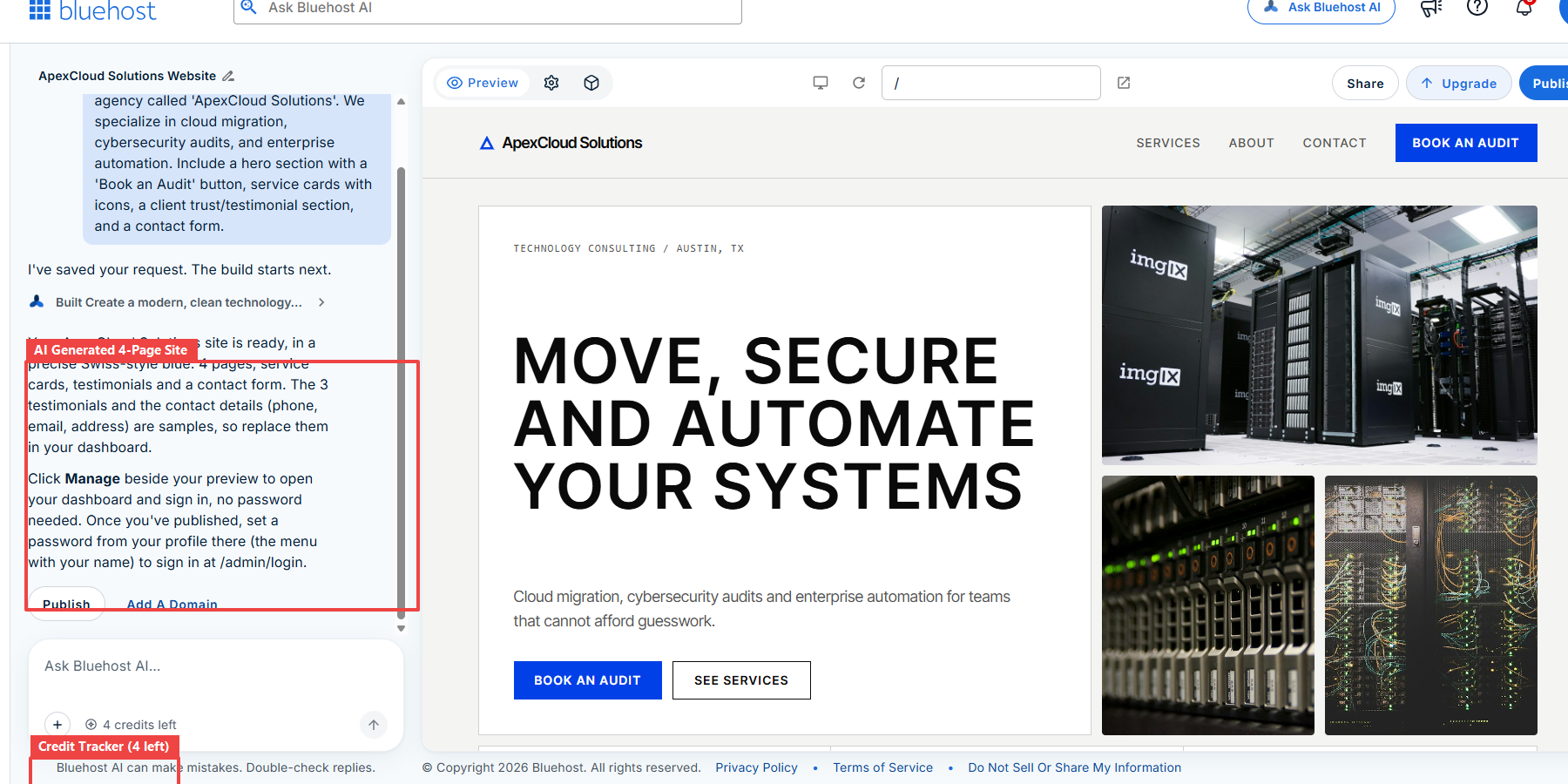
You begin by describing what you need in plain words. For our hands-on review at ItGyan, we prompted it to build a full website for a technology consulting firm called "ApexCloud Solutions". (You can read our full step-by-step experience in our Bluehost AI Builder Review).
In under two minutes, the builder laid out a cohesive multi-page structure with clean typography, contextual copy, and responsive containers.
Why It Leads for Beginners
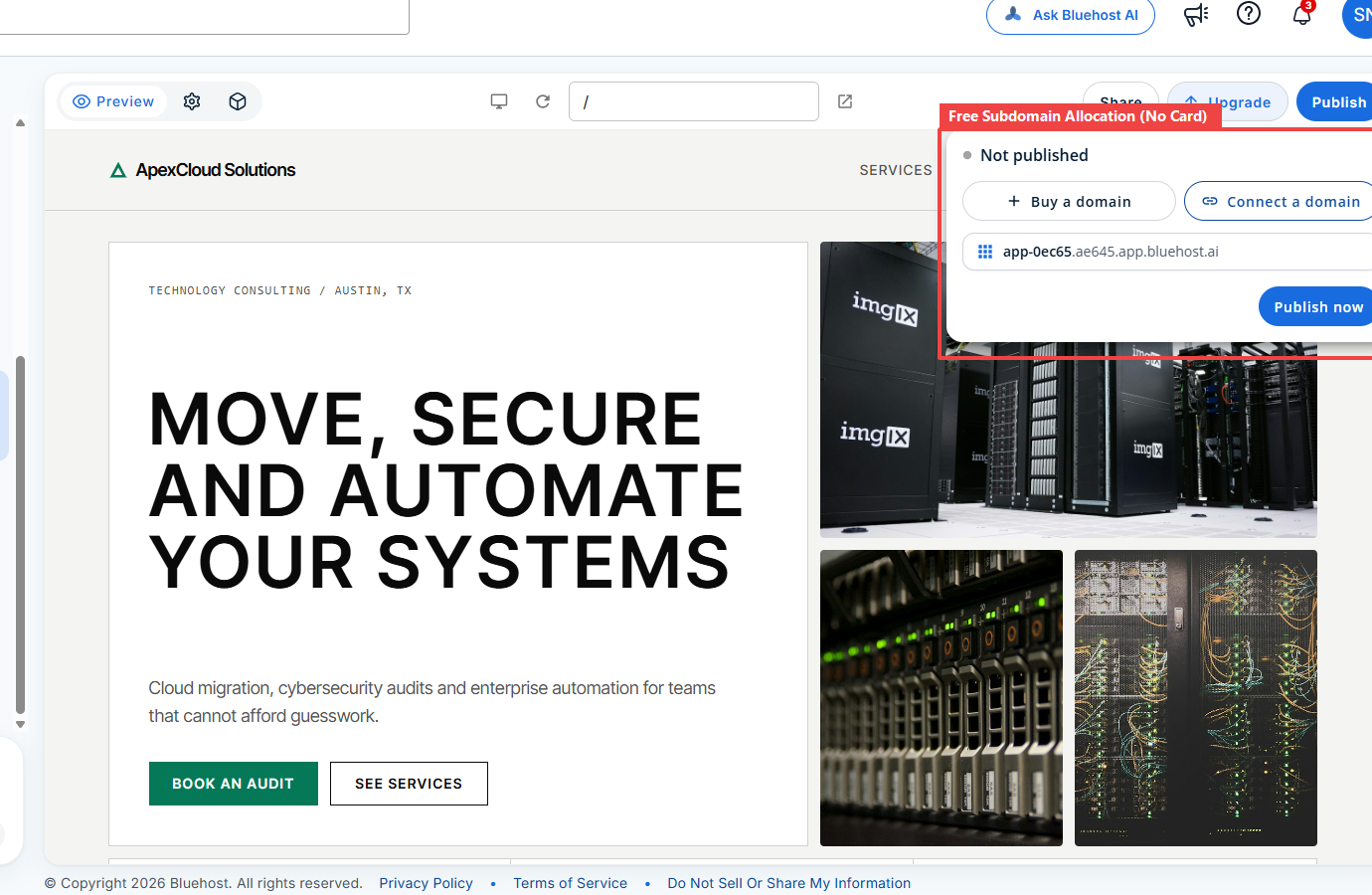
- Truly Free to Go Live: Many competitors force you to input credit card details before publishing. Bluehost AI Builder lets you deploy a real site to a secure
yourname.app.bluehost.aisubdomain at $0 to start, no credit card required. - Conversational Refinements: Want to tweak styling or swap colors? You simply chat with the AI. During our test, we asked it to switch button accents to emerald green and check mobile alignment, and it made the changes cleanly.
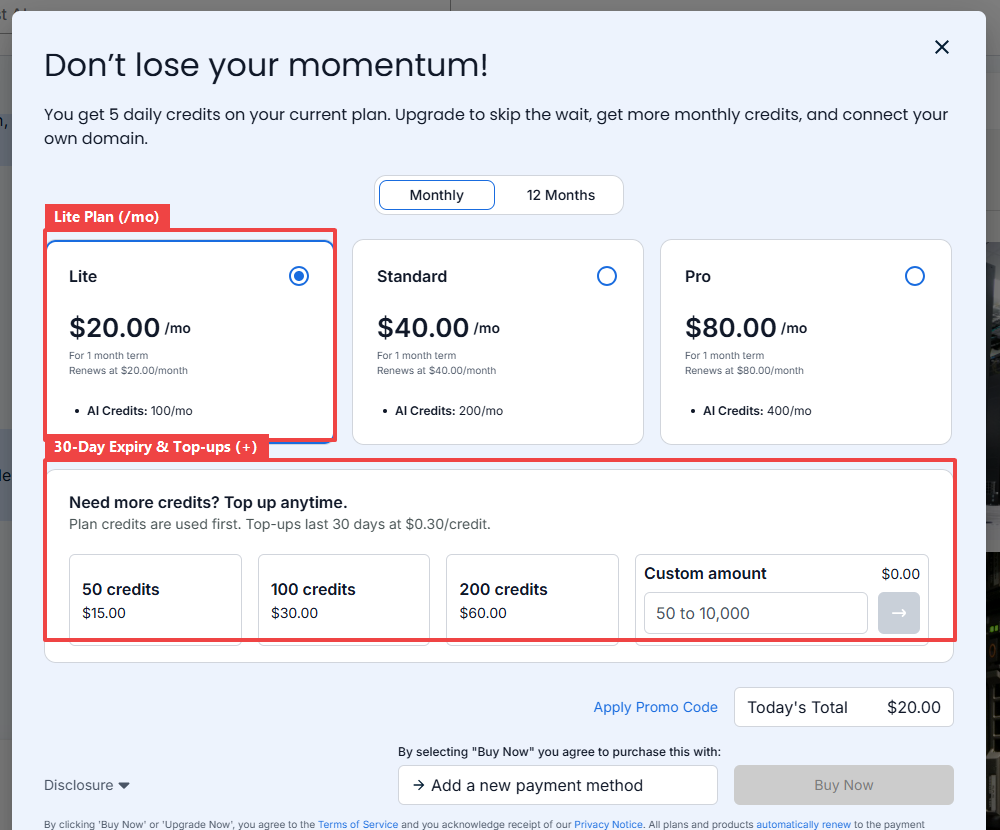
- Sensible Credit Rules: You get 5 free credits per day (up to 30 per month). Clarifying questions from the AI are free. If credits run out, the published site stays online; only new AI edits pause until your cycle resets or you purchase a top-up pack (50, 100, or 200 credits starting from $15). Monthly credits and top-ups expire after 30 days.
2. Wix AI: Great Flexibility, Higher Complexity
Wix has integrated generative AI deeply into its platform. You answer an onboarding questionnaire, and the AI suggests a preliminary layout that you can edit on Wix's free-form canvas.
Strengths
- Unmatched visual customization: You can drag and drop elements virtually anywhere on the screen.
- Extensive third-party app ecosystem for appointments, reservations, and membership portals.
- Solid built-in marketing automation and SEO tools.
Weaknesses
- Intrusive Free Tier: Wix's free plan displays a noticeable brand banner across the top of your site and uses a long, awkward URL structure.
- Steep Learning Curve: The sheer number of panels, sliders, and settings in Wix Studio can quickly overwhelm non-technical users.
- Costly Renewals: Intro pricing often climbs significantly upon annual renewal.
3. Hostinger AI Website Builder: Budget-Oriented, Rigid Layouts
Hostinger bundles an AI site generator with its shared and cloud hosting plans. It asks for your site type and description, generating three layout variants to choose from.
Strengths
- Very low promotional rates if you are willing to commit to multi-year hosting upfront.
- Clean, minimalist block editor that prevents accidental layout breaks.
- Integrated AI logo maker and blog post drafts.
Weaknesses
- No Free Testing: There is no free tier—you must purchase a hosting plan with a credit card before seeing what the builder creates.
- Less Conversational: Once the initial site is built, revisions must be made manually by clicking blocks rather than refining via chat.
- Grid Restrictions: Modifying column ratios or responsive stacking outside pre-built sections can be frustrating.
4. Squarespace AI: Beautiful Aesthetics, Premium Cost
Squarespace's AI (Blueprint AI) focuses on styling and copy generation to help you assemble a website inside their design-first template framework.
Strengths
- Industry-leading typography, spacing, and editorial aesthetics out of the box.
- Exceptional layout options for visual portfolios, photography, and creative artists.
- Clean audio integration for podcasts and music creators.
Weaknesses
- No Permanent Free Tier: Squarespace only offers a 14-day trial period; you cannot keep a live site online without paying.
- Higher Price Point: Plans typically start around $16/mo on annual billing ($23/mo monthly), making it a larger financial commitment for early-stage ventures.
- Limited Chat Editing: AI assistance is primarily focused on copywriting rather than real-time conversational layout updates.
Pricing & True Cost of Ownership Compared
Here is what it actually costs to launch a working website across these four services:
| Platform | Cost to Launch Online | Credit Card Required Upfront? | Custom Domain Starting Price |
|---|---|---|---|
| Bluehost AI Builder | $0.00 (Free Plan) | No | Paid plans from $20/mo |
| Wix | $0.00 (Heavy Ads) | No | From ~$17/mo |
| Hostinger AI | ~$35 – $48/year | Yes | From ~$3.99/mo (promo) |
| Squarespace | ~$192 – $276/year | No (14-day trial only) | From ~$16/mo |
Important Distinction: Building Websites vs. Online Stores
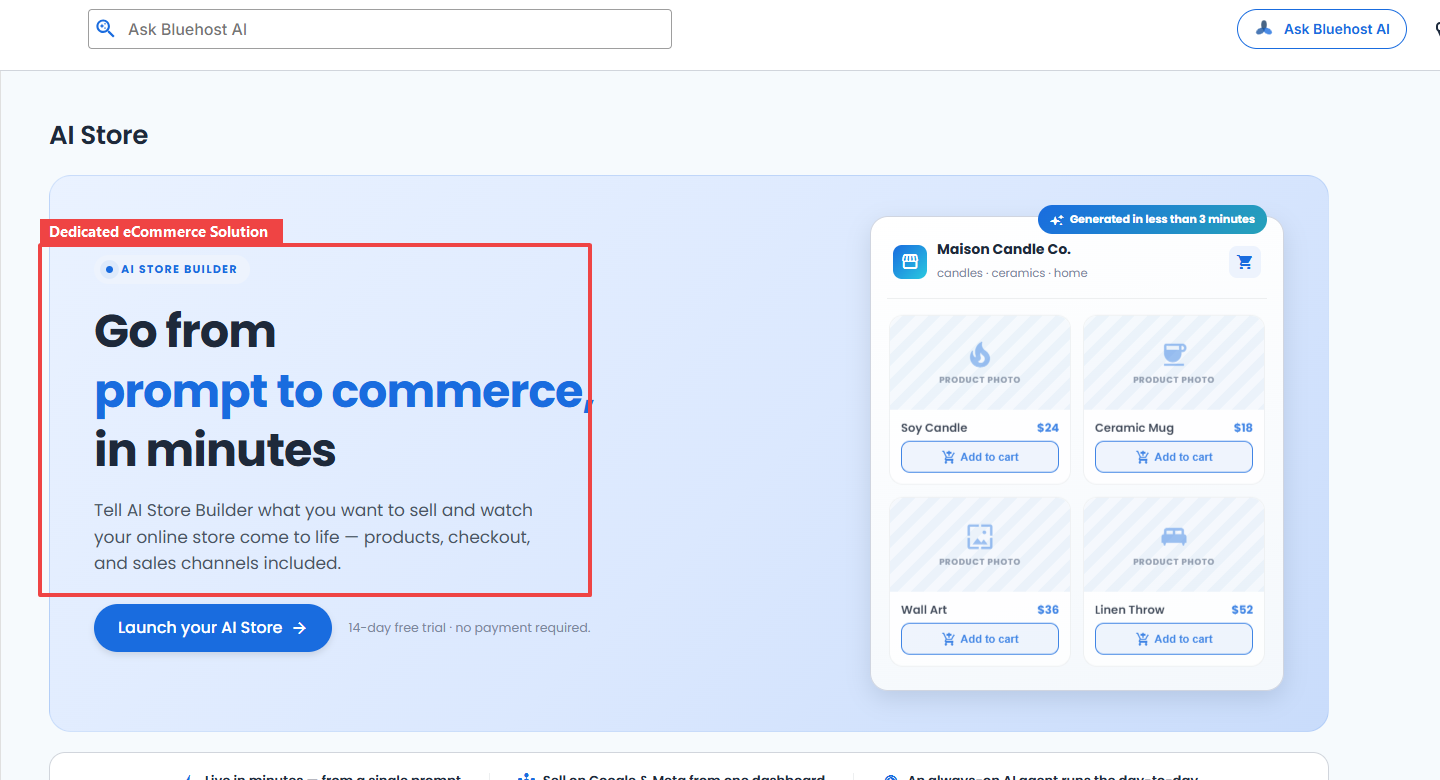
One crucial operational detail: Bluehost AI Builder is designed for websites, service agencies, portfolios, blogs, and landing pages. It does not support eCommerce carts or product checkout at this time.
If your primary objective is to launch an online storefront with shopping carts and payment processing, check out Bluehost's dedicated commerce solution instead:
👉 Explore Bluehost AI Store for Online Retail (I earn a commission if you sign up through this link).
Frequently Asked Questions (FAQ)
How does Bluehost AI Builder compare to Wix and Squarespace for beginners?
Bluehost AI Builder is much more conversational. Instead of dragging individual boxes on a screen, you describe your idea and refine it by chatting. It also lets you publish live to a subdomain at $0 to start, no credit card without adding forced banner advertisements like Wix's free tier.
Is a credit card required to try Bluehost AI Builder?
No. You can sign up with an email, Google, Apple, or GitHub account and build your website without entering payment information.
Can I connect my own custom domain to Bluehost AI Builder?
Yes, connecting your own custom domain requires upgrading to paid plans from $20/mo (the Lite plan or above).
Can I sell products on Bluehost AI Builder?
No. Bluehost AI Builder is designed for content, business, and portfolio websites. For shopping carts and inventory management, use Bluehost AI Store.
Final Takeaway: Which Builder Should You Choose?
- Choose Bluehost AI Builder if: You want the fastest, zero-risk way to launch a service business, consulting agency, portfolio, or landing page. The ability to publish live with $0 to start, no credit card, refine copy through natural chat, and rely on 24/7 human support makes it the most beginner-friendly platform in 2026.
- Choose Wix if: You have previous visual design experience and need pixel-level positioning across complex database-driven layouts.
- Choose Hostinger if: You are seeking an all-in-one shared hosting package and are comfortable paying upfront for a multi-year term.
- Choose Squarespace if: High-end visual aesthetics and photography portfolios are your primary focus, and you have the budget for a premium ongoing subscription.
For non-technical creators and small business owners who want to get a working idea online today without hitting payment walls, Bluehost AI Builder delivers the cleanest, most accessible path to launch.
I earn a commission if you sign up through this link.